Torek Vehicle trip log software
Updated
Trip logs on the phone: the driver fills it in on the road, the manager approves
A trip log is the document that records a company vehicle’s trips: the date, mileage, time, driver and purpose. It substantiates fuel and vehicle costs. Its weak point is always the same: the readings are written up at the end of the month from memory.
In Torek the trip log is filled in while the driving happens. The driver starts and ends each trip on the phone (it works offline), the manager approves the log in the browser, and the approved mileage becomes the vehicle’s odometer reading, which maintenance is planned against. No GPS hardware is needed.
How the driver fills in the log on the phone
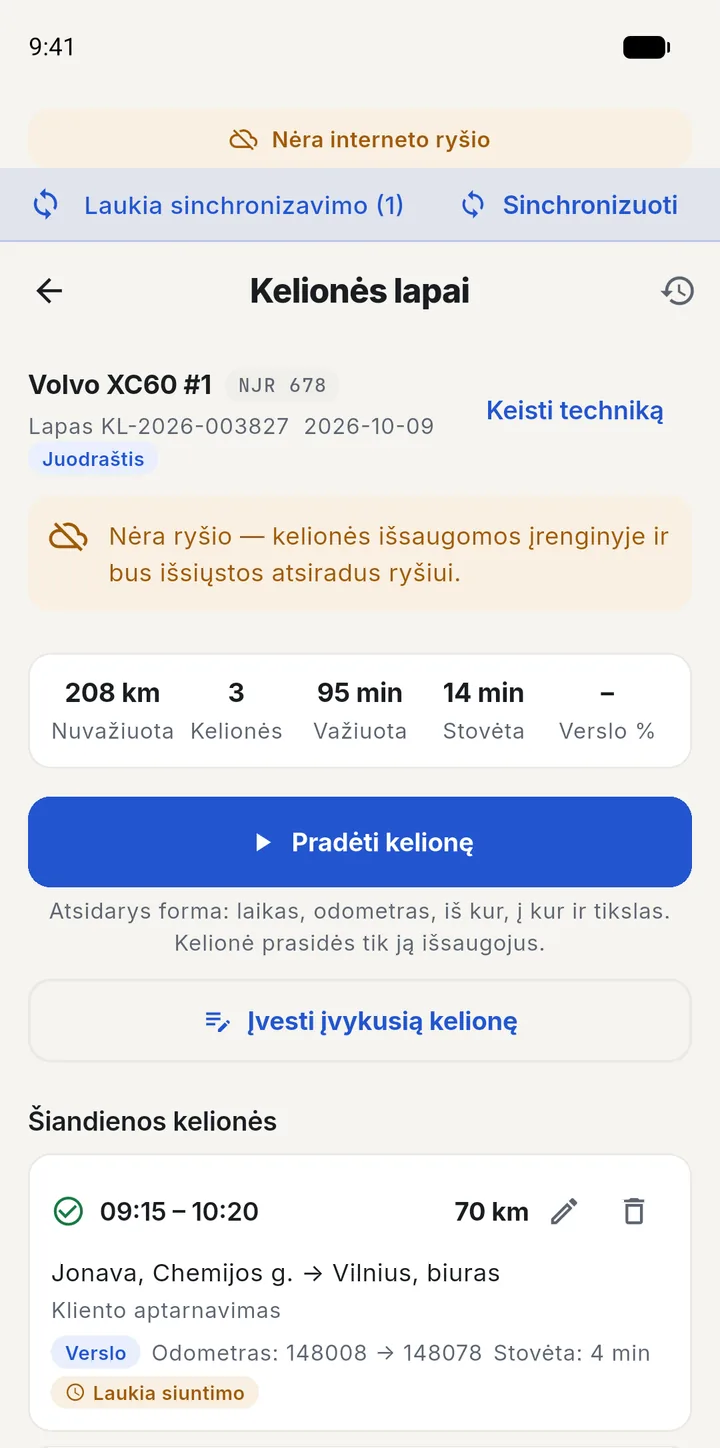
The vehicle is chosen once — the app remembers it the next day too. From there the day is simple: start a trip, end it, and submit the log at the end of the day. Nothing has to be created in advance — the log appears when the first trip of the day starts.
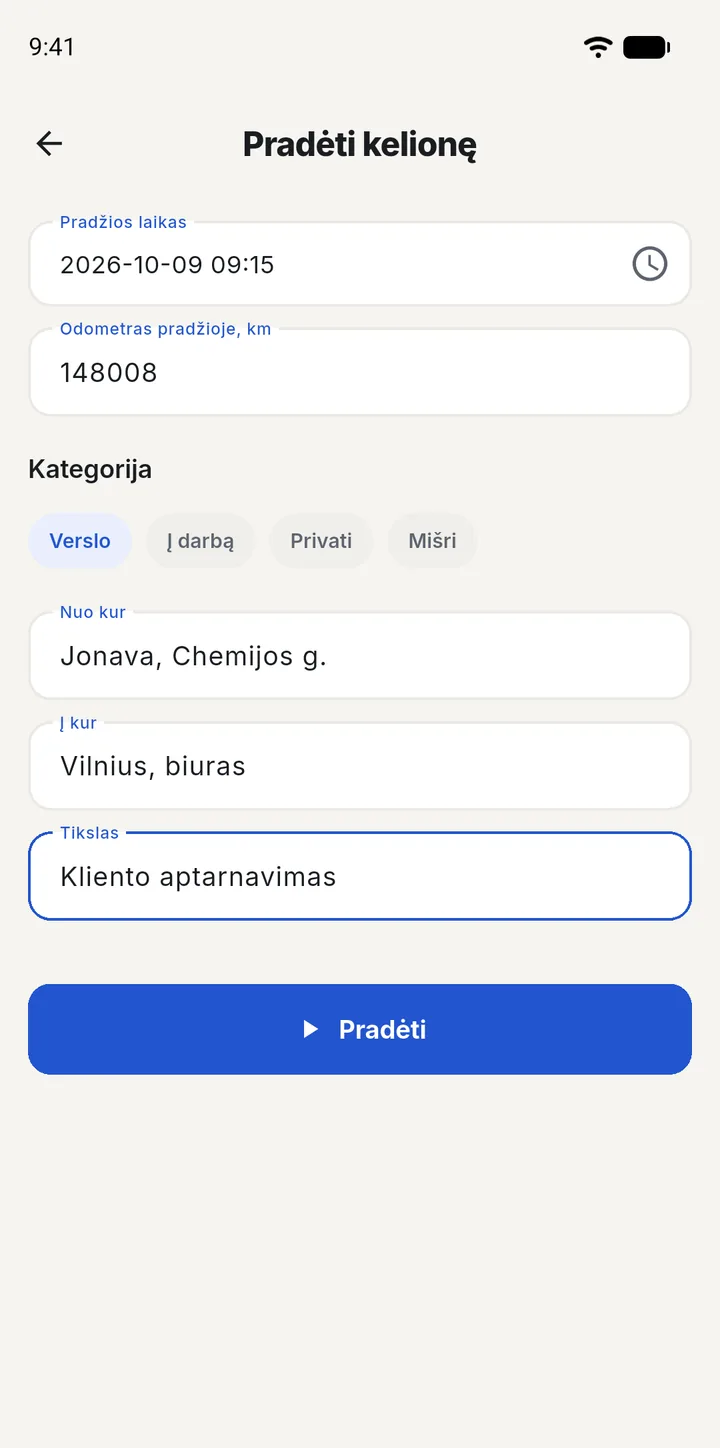
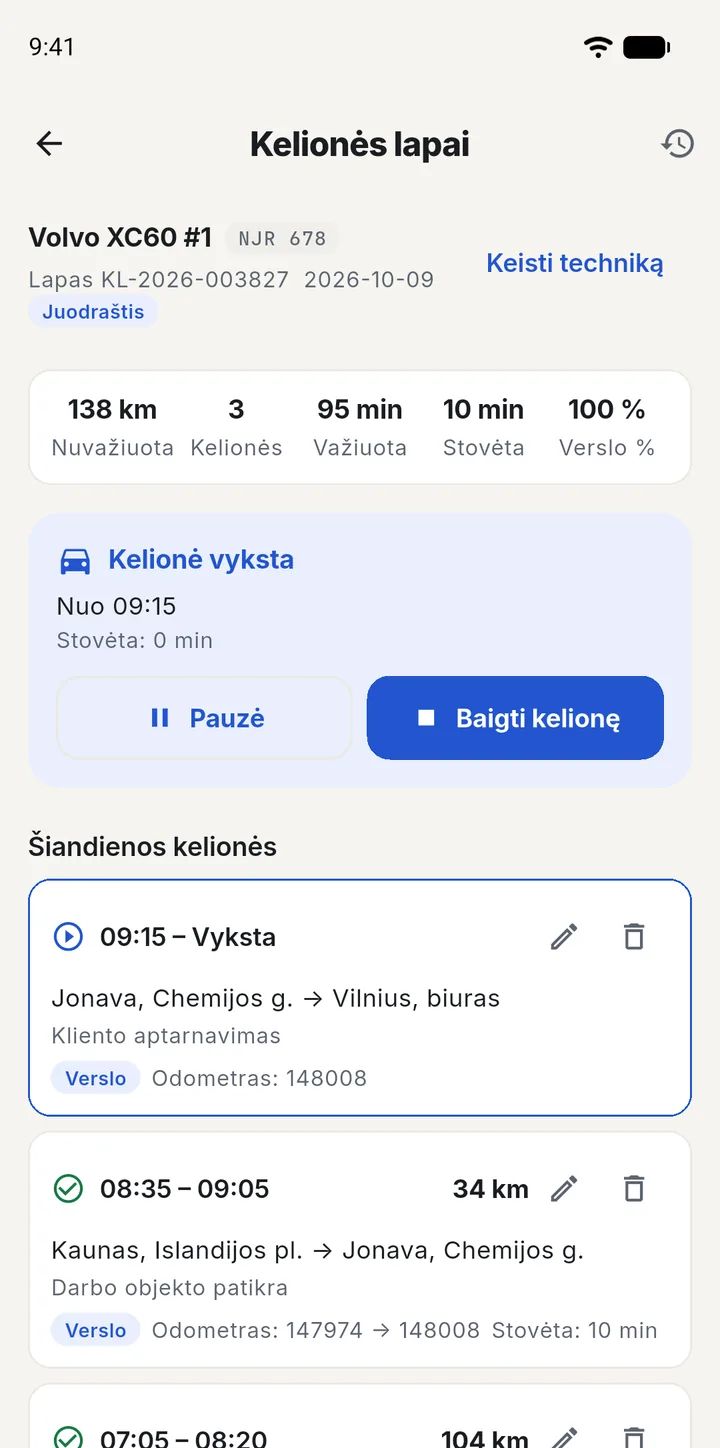
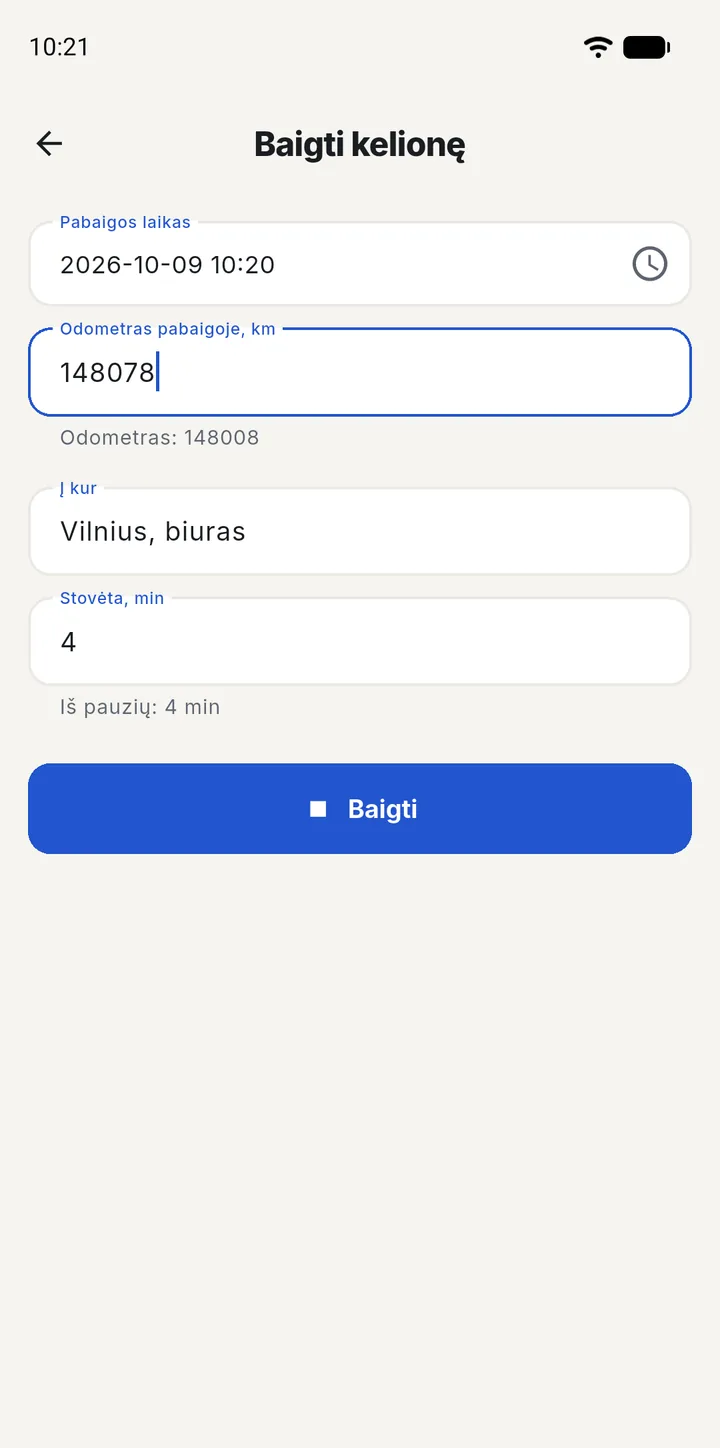
Screens are shown in Lithuanian; the interface is also available in English.
- A forgotten trip. If the driver did not get round to starting a trip, they add it later as a completed trip.
- A trip in progress is not forgotten. Until it is ended, the driver sees it as soon as they open the app — it is hard to forget to end it.
- Submitting. At the end of the day the driver submits the log, and it goes to the manager for approval. While a trip is still open, submitting is not allowed.
Private trips, working offline and history
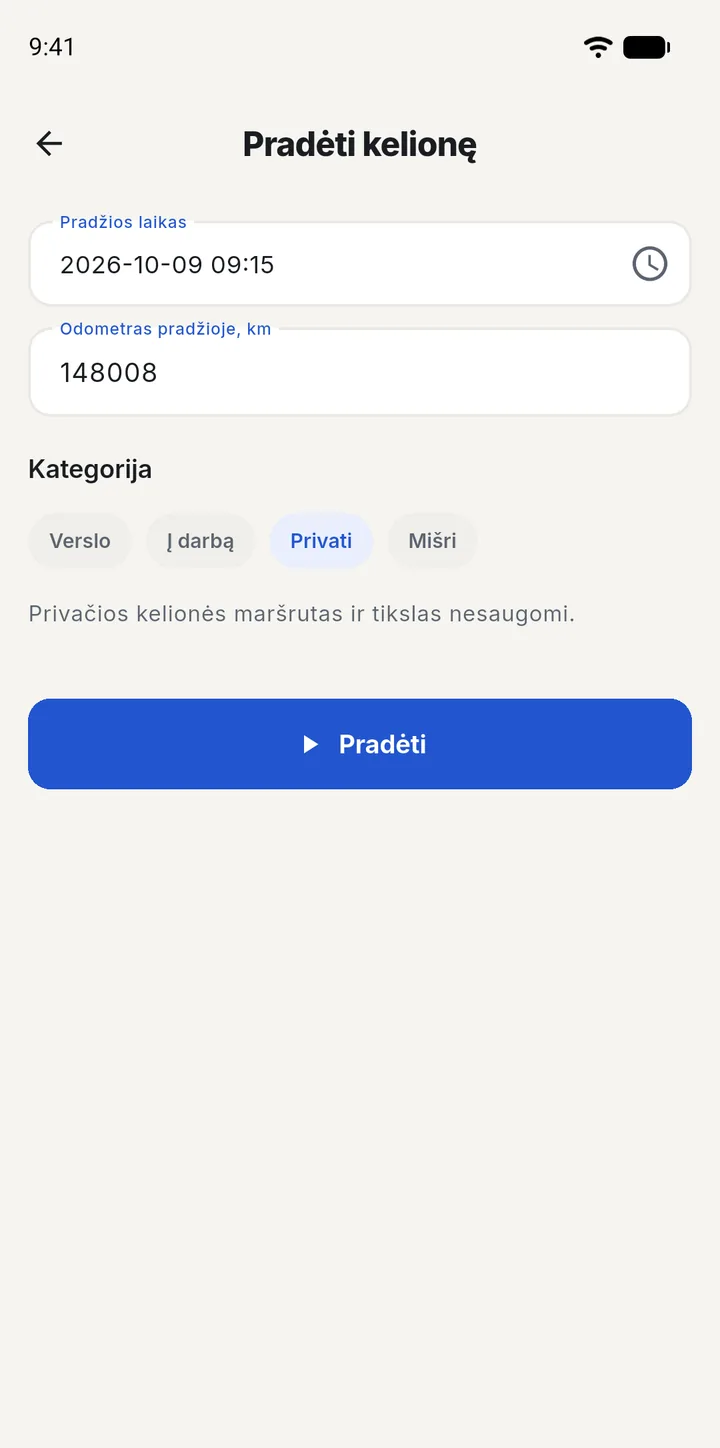
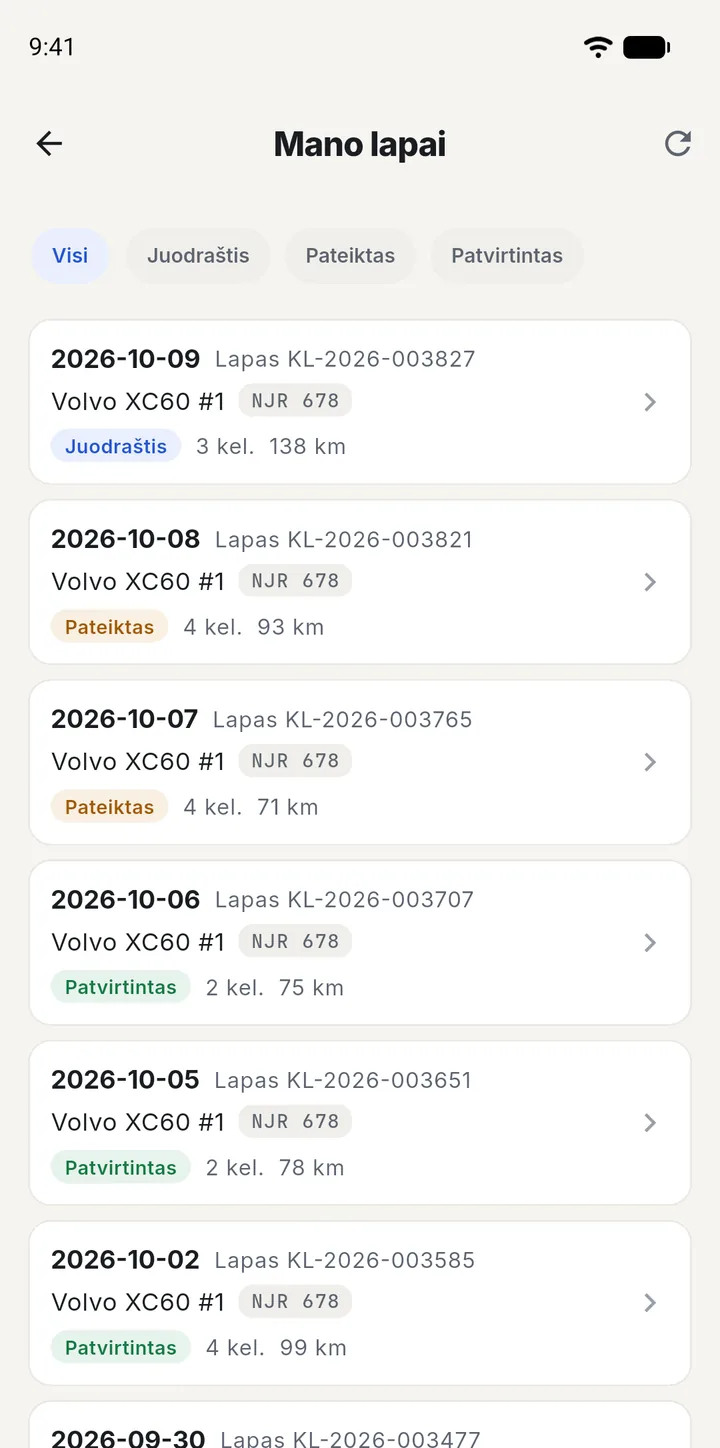
- Privacy. Every trip gets a category: Business, Commute, Private or Mixed. A private trip’s route and purpose are not stored, so the manager sees how far was driven for personal purposes but not where.
- Offline. Once the day’s log is open, trips out of town or in an underground car park are started and ended without internet. A trip sent twice is not duplicated. A connection is needed again to submit the log.
- A returned log. If the manager has returned the log, the driver sees the reason in the app and corrects the trips right there.
What the manager sees
Submitted logs wait for approval in the browser, and the manager sees how many have piled up. The log shows the opening and closing odometer, every trip with its time, kilometres, category and route, how much fuel went into that vehicle over the log’s period, and warnings if something does not add up.
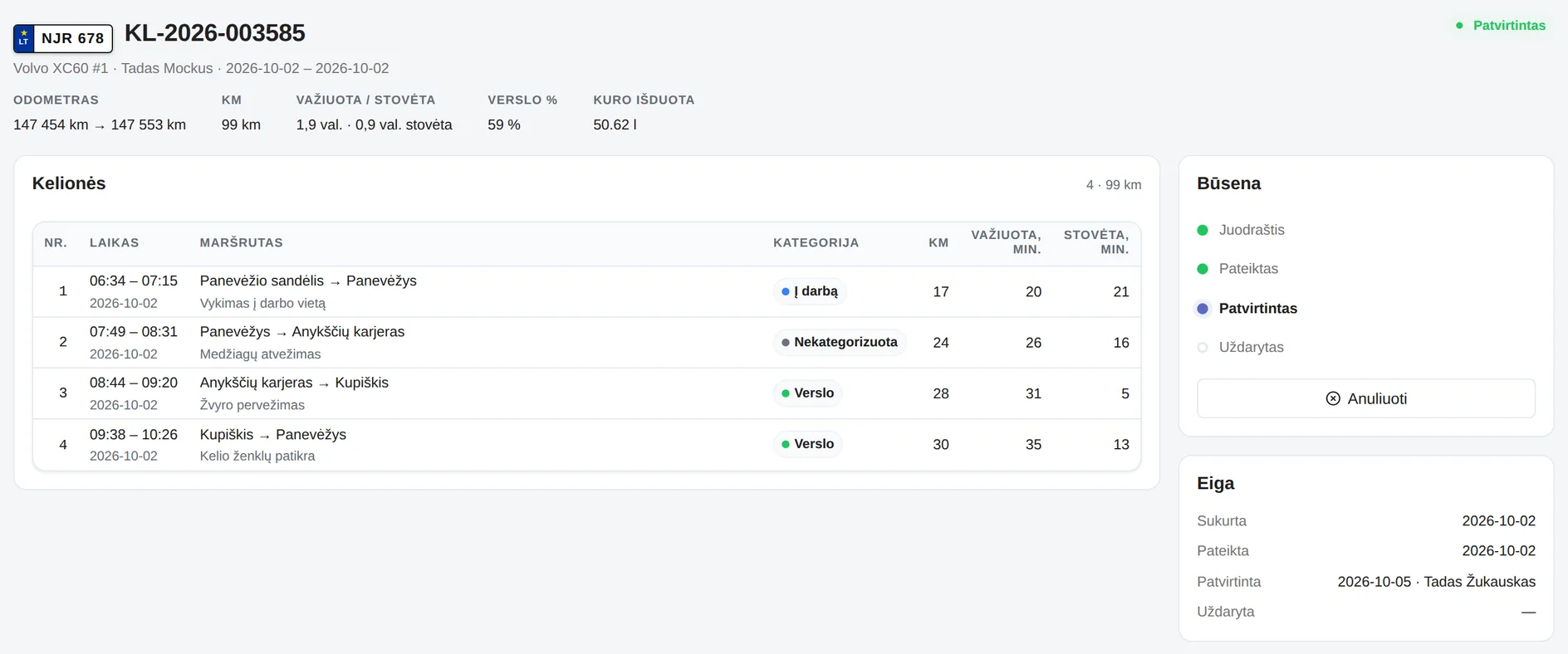
- Approve, return, void. Returning a log requires a reason. An approved log is locked.
- Warnings, not prohibitions. The log’s opening mileage below the last known reading, unrecorded kilometres between trips (the next trip starts more than 1 km above where the previous one ended), mileage going “backwards”, overlapping trips, an implausible trip (longer than 12 hours, more than 1,500 km or an average speed above 150 km/h), a trip without a category or not yet ended, a missing purpose or distance. The system points it out, but the manager decides.
- Fuel on the log. Every fill-up belongs to exactly one log, so the same fuel never shows up on two logs. If a fill-up is entered after the log was submitted, the log shows this clearly.
- The source of mileage. When a log is approved, its closing mileage is written as an odometer reading — preventive maintenance uses it to forecast upcoming services.
- Numbering. The system assigns the number, for example KL-2026-000001; there are no duplicates, and a number, once issued, is never issued again.
- Exports. One log or a whole period as PDF or Excel, and a trip summary for the accountant — in Excel, or as a PDF for printing.
- Statistics. Kilometres, driving and idle time, trip count and the share of business trips — by day or week, vehicle, driver and category. What these numbers say alongside fuel consumption: fuel consumption and trip analysis.
Only trip logs and fuel — without the repair modules
A company that only needs trip logs and fuel tracking can use just this part. Two roles are enough:
- The trips administrator approves logs, manages fuel norms and creates staff accounts. They can set a new employee’s password themselves — no email invitation needed.
- The driver sees and fills in only their own trips and fill-ups.
When a log is submitted, the trips administrators get a notification; when it is returned for correction, the driver does.
How this differs from GPS and accounting software
| Torek trip logs | GPS tracking system | Accounting software | |
|---|---|---|---|
| Where the mileage comes from | The driver enters it on the phone, the manager approves | Automatically from the device | Retyped from paper |
| Hardware required | No — a phone or a browser | A device in every vehicle | No |
| When it is filled in | During the trip, works offline too | Automatically | At the end of the month |
| Private trips | Only the kilometres remain, the route is not stored | Always tracked | By hand |
| Link to vehicle maintenance | Approved mileage updates the odometer and the maintenance plan | Usually only through an integration | None |
What the module does not do yet: it does not send logs straight into accounting software — they leave as PDF or Excel files; if your accounts team needs a direct link, tell us during the demo. Routes and kilometres are entered, not traced from GPS.
Frequently asked questions
How does the driver fill in the trip log on the phone?
On the phone they choose the vehicle and start the trip: the time and the odometer reading fill in by themselves, leaving the category to mark and, if needed, where they are driving from, where to and for what purpose. On arrival they end the trip and enter the odometer. At the end of the day they submit the log to the manager for approval.
A forgotten trip is added later as a completed trip. The same log can also be filled in in the browser.
Does the trip log have to be created in advance?
No. The day’s trip log appears when the driver starts the first trip of that day. No empty logs are left behind: a log without trips is voided.
What if a driver has no phone?
The manager can enter the trip in the browser, with the odometer reading at the start and at the end. From there the log is approved the same way as one filled in on the phone.
Does the app work without internet?
Yes. Once the day’s log is open (that step needs a connection), trips are started, ended, corrected and added offline: they are saved on the phone and sent when the connection returns. A trip sent twice is not duplicated.
A connection is needed again to submit the log for approval.
Does trip log software need a GPS device?
Torek does not. The driver enters the readings and the route, and the manager approves the log. There is no hardware to install, no tracking subscription to pay and no location-data processing to arrange.
A GPS tracking system shows where a vehicle is right now. A trip log substantiates mileage and fuel costs with a document that is tied to the vehicle’s maintenance history.
Can the manager see where private trips went?
No. For a private trip no route or purpose is entered, and the system clears the route, purpose and counterparty even if they were already filled in. Only the kilometres and the time remain — just enough to substantiate the mileage.
What happens when a log is approved?
The log is locked and its closing mileage is written as the vehicle’s odometer reading (on the phone the odometer is entered for every trip). Upcoming services are forecast from this mileage, and the fuel write-off report takes the odometer at the start and end of the month from the same history.
If there is a mistake in the log, the manager returns it to the driver with a stated reason. The driver sees the return note in the app and corrects the trips right there.
How are trip logs numbered?
The system assigns the number: the format is KL-2026-000001, with the year in the middle and a sequence number at the end. Numbering restarts at the beginning of each year, and the prefix (KL by default) is adapted to your company’s convention.
Because the number comes from the system, there are no duplicates even when several people create logs at the same time. A number, once issued, is never issued again: if a draft is deleted, its number stays skipped, so there can be gaps in the sequence.
Can trip logs be printed or handed to the accountant?
Yes. A single log or all the logs for a period export to PDF and Excel. For the accountant there is a separate trip summary, in Excel or as a PDF for printing.
Logs are not sent straight into accounting software — they are handed over as files.
Why does a company need trip logs?
A trip log substantiates that the vehicle and its fuel were used for company business: it records the date, mileage, time and purpose of the trip. In practice it is needed to write off fuel costs and to avoid disputes over vehicle use.
The exact requirements for your company are worth confirming with your accountant — they depend on the business and its accounting policy.
What are the most common mistakes?
Backdated entries at the end of the month, when the readings are “stretched” to fit. The second mistake: the mileage on paper lives separately from the mileage that maintenance is planned against, and sooner or later the two sources drift apart.
Torek flags such places for the manager with a warning before approval: the log’s opening mileage below the last known reading, unrecorded kilometres between trips (the next trip starts more than 1 km above where the previous one ended), mileage going “backwards”, overlapping trips, an implausible trip (longer than 12 hours, more than 1,500 km or an average speed above 150 km/h), a trip without a category or not yet ended, a missing purpose or distance. Warnings do not block the log — the manager decides. Only an empty log and a log with an unfinished trip cannot be submitted.
Trip logs that drivers fill in themselves
A demo: the driver’s app, the manager’s approval and trip statistics.
Get in touch